SOCIAL MEDIA MANAGEMENT
Social media scheduling and management for East Tennessee businesses
Media Lifeline Pro puts every social channel behind one calendar, so you can plan and schedule weeks of posts in one sitting. RBA Marketing and Media sets it up and supports it in Sevierville, Tennessee. Schedule your own Facebook, Instagram and Google Business Profile posts ($297/mo partner plan, $0 setup through December 31, 2026), or have our Sevierville team plan, film, write and publish for you as a done-for-you add-on.
Answers by Rich Benjamin, Owner, RBA Marketing and Media · Last updated
The short version
- What it is: Media Lifeline Pro is an all-in-one CRM and marketing platform;RBA Marketing and Media sets it up and supports it in Sevierville, Tennessee, with social media scheduling built in.
- Two prices: $297/mo to schedule your own posts (Partner Plan), or a done-for-you add-on to have RBA plan, write and publish for you.
- 10 networks: Post to Facebook, Instagram, Google Business Profile, LinkedIn, TikTok, YouTube, Pinterest, Threads, Bluesky and your built-in community from one calendar.
- Two-week setup: RBA connects your accounts and builds your calendar in about two weeks from your demo, with $0 setup through December 31, 2026.
Media Lifeline Pro is an all-in-one CRM and marketing platform made by Media Lifeline. RBA Marketing and Media is an authorized partner that sets it up and supports it in East Tennessee.
WHAT'S INCLUDED
What's included in social media management
One calendar for 10 networks
Media Lifeline Pro's social planner lets you draft, schedule, and publish to Facebook, Instagram, Google Business Profile and seven more networks from a single view. See your whole month at a glance and spot the gaps before your audience does. RBA connects your accounts during setup.
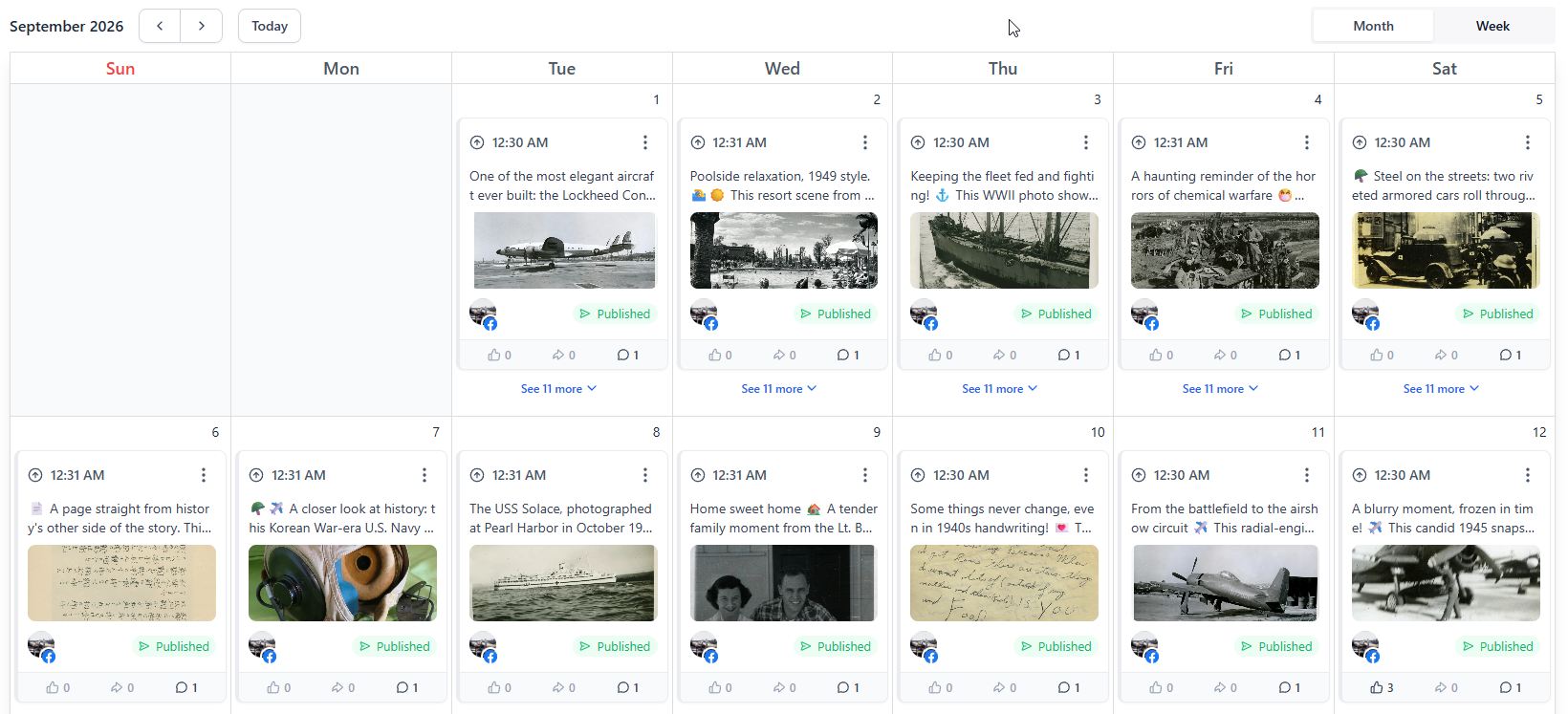
Batch a month of posts in an afternoon
Write ten posts while you're in the zone, queue them out over four weeks, and stop staring at a blank composer on a Tuesday night. Media Lifeline Pro publishes each post at the time you set, so the calendar fills itself while you work.
Replies in the same inbox as everything else
A Facebook comment, an Instagram DM, a text, and a web form all show up in one conversation stream inside Media Lifeline Pro — attached to that person's contact record. You answer from one screen instead of hunting across apps.
Approve and post from the LeadConnector mobile app
The LeadConnector mobile app for iOS and Android lets you approve a draft, drop in a job-site photo, and push it live between appointments. Your calendar keeps moving even when you're not at a desk.
What actually worked, in plain numbers
Media Lifeline Pro reports reach, engagement, and clicks per post in plain numbers, so you can do more of what earns calls and less of what doesn't. RBA reviews the numbers with you and adjusts the plan.
Which social networks can you post to from Media Lifeline Pro?
Media Lifeline Pro connects directly to the networks below. RBA sets up each connection and confirms post types during onboarding.
Facebook
Posts, photos, and links to your Facebook Page.
Instagram
Feed posts and photos to your business profile.
Google Business Profile
Updates and offers that appear in Google Search and Maps.
LinkedIn
Company page posts and updates.
TikTok
Short-form video posts.
YouTube
Video uploads and Shorts.
Pinterest
Pins and board updates.
Threads
Text and image posts.
Bluesky
Posts to your Bluesky account.
Lifeline Communities
Posts to your built-in community space.
As of September 2026, Media Lifeline Pro posts to the networks above. Availability for a given network depends on the platform's current API connections, which RBA confirms during setup.
WHO POSTS & OWNS IT
Who posts, and who owns your pages
You schedule and publish your own posts in Media Lifeline Pro, or you can hire RBA Marketing and Media to manage your posting for you. You own your social media pages and the content you post.
Can you run Facebook, Google and LinkedIn ads from Media Lifeline Pro?
Yes. Media Lifeline Pro's ad manager runs Facebook, Google and LinkedIn ads from the same dashboard as your posts and contacts. RBA Marketing and Media can set up your ad campaigns during onboarding. Ad spend itself is billed by each network directly to your card — it is not part of your Media Lifeline Pro plan.
DIY OR DONE FOR YOU
Two ways to handle your social media: do it yourself or have RBA Marketing and Media do it
Schedule your own posts in Media Lifeline Pro, or hand the whole thing to RBA's team. Both are month-to-month with no long-term contract.
| What you get | DIY (Partner Plan) | Done for you (add-on) |
|---|---|---|
| Who writes the content | You do | RBA's team |
| Who schedules and posts | You do, from one calendar | RBA plans, writes, and publishes |
| Who approves before publishing | You approve your own posts | RBA publishes on schedule (no per-post approval step) |
| Channels included | All connected channels | Up to 3 core channels |
| Short-form video | — | On-site or asset-based |
| Inbox and comment monitoring | You respond from the unified inbox | Monitored during business hours |
| Monthly price | $297/mo | Quoted on demo |
| Setup fee | $0 through December 31, 2026 | Included |
| Cancellation | Cancel anytime | 30 days' notice |
The DIY plan is Media Lifeline Pro set up and supported by RBA. The done-for-you plan is a social media management add-on. See full pricing and inclusions on the pricing page.
See full pricing and what's includedRead the full FAQ on contracts, data ownership and what happens after December 31, 2026
What it costs vs. separate tools
Social scheduling is included in Media Lifeline Pro at $297/mo through RBA Marketing and Media's partner pricing (regular price $497/mo, setup $0 instead of $1,500). Here's what most businesses pay to piece it together separately.
| Separate tool | Typical market rate | Source |
|---|---|---|
| Social scheduling tool | $15–50/mo | BufferHootsuite |
| Social inbox / engagement tool | $15–50/mo | HootsuiteSprout Social |
| Contact list / CRM | $50–150/mo | HubSpotSalesforce |
| Landing page / form builder | $25–100/mo | LeadpagesUnbounce |
| Email newsletter tool | $15–50/mo | MailchimpConstant Contact |
| Event ticketing / scheduling tool | $15–50/mo | EventbriteSimplyBook.me |
| Media Lifeline Pro (all of the above) | $297/mo — one login, one bill | Media Lifeline |
Rates checked September 2026 against the named vendors' public pricing pages; these are typical market ranges, not quotes. With Media Lifeline Pro, all of the above are one login, one bill, one team to call.
DONE FOR YOU
What does done-for-you social media management include?
RBA's done-for-you social media add-on is full social media management. Our Sevierville team builds your monthly content calendar, produces short-form video (on-site or asset-based), writes and designs posts for up to 3 core channels, and monitors comments and DMs during business hours. That's what we've done for East Tennessee tourism, real estate, contracting, hospitality, and service-based businesses for more than a decade. Everything runs inside Media Lifeline Pro, so you can see every post and result in one place.
- Monthly content calendar planned around your season
- Short-form video production (on-site or asset-based)
- Posts written and designed for up to 3 core channels
- Comments and DMs monitored during business hours
- Monthly performance review with RBA
WHAT CHANGES
What changes in the first two weeks
RBA Marketing and Media sets up Media Lifeline Pro in two weeks. After that, you schedule posts to all your channels from one calendar, or RBA Marketing and Media manages the schedule for you.
2 wk
from demo to live
1 login
replacing 6 disconnected tools
WHO APPROVES POSTS
Who approves posts before they go live?
With the done-for-you add-on, RBA publishes on schedule — there is no per-post approval step that delays your calendar. You can ask to review drafts at any time, and we share the monthly content calendar with you before it runs. On the Partner Plan, you approve and publish your own posts from the one-calendar view.
WHAT ASSET-BASED MEANS
What does asset-based video mean?
Asset-based video means we cut vertical video — Reels, Shorts, TikToks — from photos and footage you already have, instead of filming on site. On-site video means a member of RBA's team comes to your location to film. The done-for-you add-on includes either approach, planned around your season.
THE $297/MO PRICE
What happens to the $297/mo price after December 31, 2026?
Accounts we onboard during this window keep the $297/mo rate for 2 years from signup. After December 31, 2026, new accounts return to the regular $497/mo rate. Social scheduling is included on every plan, so the rate change affects the platform price — not whether you can schedule posts. We lay out the exact terms on your demo call before you commit to anything.
WHO YOU'LL WORK WITH
Who sets up and supports Media Lifeline Pro in Sevierville?
Rich Benjamin — Owner, RBA Marketing and Media
RBA Marketing and Media has built websites and run campaigns for East Tennessee tourism, real estate, contracting, hospitality, and service-based businesses for more than a decade. As an authorized Media Lifeline Pro partner, Rich and his team connect your social accounts, build your content calendar, and support it from right here in Sevierville, Tennessee.
NEED MORE CONTENT?
Need brand shoots, longer video or full campaign creative?
The done-for-you social media add-on includes posts written, designed and filmed by our team for up to 3 core channels. For work beyond that — brand photo shoots, longer-form video, and full campaign creative — see RBA Marketing and Media's content creation packages on the main site.
FROM THE OWNER
How Rich plans a social media calendar for a tourist town
“Each post should be crafted with the uniqueness of each tourist season in mind. Every season is different, and you should plan your schedule around what's expected in town. Bus tour marketing takes a different approach than car show marketing. Always start scheduling your posts two to three months in advance.”
“The biggest advice I can give you is to have a plan for your posting. We recommend having your social media plan created by the middle of January, ready to work on months before you need the posts. There's nothing worse than the last-minute panic of realizing your business is down and you didn't start advertising your specials early enough.”
ALSO INCLUDED
What else does Media Lifeline Pro do besides social media?
Email & Text Newsletters
Turn your social followers into contacts you actually own and can message directly.
See email & text newslettersContact Management
Every comment and DM creates a contact record you can follow up with later.
See contact management and segmentationAutomation & Reviews
Tie your posts to automated follow-ups and review requests that run on their own.
See automation and review requestsSEE IT FOR YOURSELF
Book a 30-minute demo
We'll pull up Media Lifeline Pro, plug in your actual business, and show you exactly where your leads are leaking today. You get a written follow-up summary within one business day whether you move forward or not.
30 minutes · Screen share